
Model-Driven Apps: When Canvas Apps Aren't Enough
Introduction
Canvas apps excel at custom UX and simple workflows, but complex relational data, heavy CRUD operations, and enterprise security requirements quickly expose their limits. Model-driven apps flip the paradigm: you define tables, relationships, and security in Dataverse, then the platform auto-generates forms, views, and business process flows. The result is faster development, built-in role-based security (table, field, row-level), solution-based ALM, and metadata-driven UI that adapts without code changes.
This guide shows when to choose model-driven, how to design the data model, configure security roles, optimize forms/views, add business process flows, decide between Power Automate and plugins, and manage ALM across environments.
Prerequisites
- PowerApps license (per-user or per-app)
- Dataverse environment provisioned
- Security roles alignment (System Administrator or equivalent)
When to Choose Model-Driven Over Canvas
| Scenario | Canvas App Limitation | Model-Driven Advantage |
|---|---|---|
| Complex relational data | Manual relationships & delegation constraints | Native relational modeling & forms |
| Heavy CRUD operations | Formula complexity & control overhead | Auto-generated forms/views |
| Role-based security | Custom logic required | Field/Table/Row level security built-in |
| Enterprise governance | Harder ALM layering | Managed/unmanaged solution layering |
| Rapid UI evolution | Manual layout rework | Metadata-driven rendering |
Architectural Principles
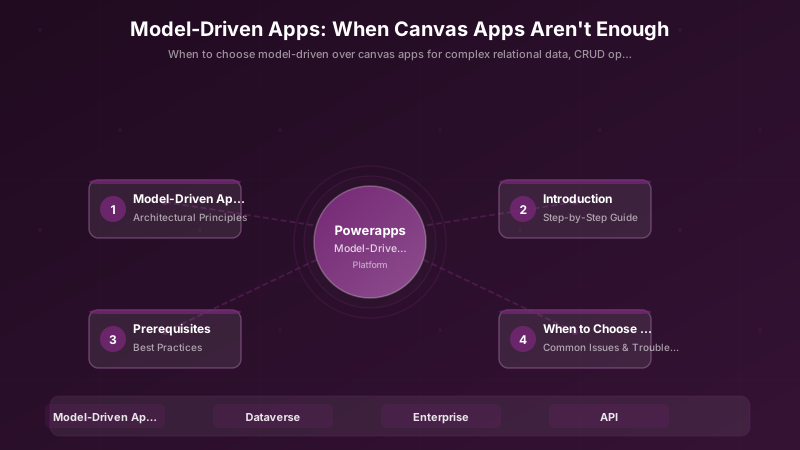
Layered architecture:
- Data Model: Tables, relationships, choices, calculated/rollup columns
- Security: Business units, teams, security roles, field-level security
- Forms/Views: Main forms, quick create, quick view forms; system/personal views
- Business Logic: Business rules, calculated fields, workflows, plugins
- Processes: Business process flows, Power Automate cloud flows
- Integration: Virtual tables, custom connectors, Azure Service Bus
This separation ensures that changes to security don't require UI redesign; adding a field updates all forms automatically; and ALM promotes layers independently.
Step-by-Step Guide
Step 1: Define the Data Model
Start with core tables (e.g., Project, Task, Milestone), ownership type (User/Team or Organization), and relationships (1:N, N:1, N:N). Use Choices (formerly Option Sets) for status fields to enable filtering and reporting.
PAC CLI to create a table:
pac auth create --environment https://contoso.crm.dynamics.com
pac data create --entity-logical-name ctso_project --entity-display-name "Project" --entity-plural-name "Projects" --ownership-type UserOwned
Key decisions:
- Ownership: User/Team for row-level security; Organization for shared reference data.
- Relationships: Define lookup fields and cascade rules (Restrict, Delete, RemoveLink).
- Auditability: Enable auditing on sensitive tables for compliance.
Step 2: Security Model & Roles
Business Units & Teams:
- Organize by department or region (Sales BU, EMEA BU).
- Assign users to teams; grant roles to teams for scalable access.
Security Roles: Define privileges per table (Create, Read, Write, Delete, Append, AppendTo, Assign, Share). Set scope: User, Business Unit, Parent:Child BU, Organization.
Field Security Profiles: Restrict sensitive fields (Salary, SSN) by creating a field security profile and granting Read/Update only to specific roles.
Example role privilege matrix:
| Role | Project (Read) | Project (Write) | Task (Read) | Task (Write) |
|---|---|---|---|---|
| PM | Organization | Business Unit | Organization | Business Unit |
| Contributor | Business Unit | User | Business Unit | User |
Step 3: Forms and Views Optimization
Form design:
- Limit to 3-4 tabs; group related fields.
- Use header fields for key metadata (Status, Owner, Due Date).
- Add quick view forms to show related record summaries inline (e.g., Account details on Contact form).
- Hide unused sections; enable "Show only unused fields" during design to identify bloat.
Views:
- Create role-specific views (My Active Projects, All Overdue Tasks).
- Use FetchXML for advanced filtering (dates, rollups, related table criteria).
- Enable search columns for frequently queried fields.
Performance:
- Remove hidden fields from form; they still load and impact performance.
- Defer script loading for custom web resources.
Step 4: Business Process Flows
Business Process Flows (BPFs) guide users through stages (Qualify → Develop → Propose → Close). Each stage surfaces required fields and actions.
Design pattern:
- Define 3-5 stages; avoid over-complication.
- Use conditional branches for different paths (Win vs Loss, Escalated vs Standard).
- Set required fields per stage to enforce data quality.
- Track stage transitions in reports for funnel analysis.
Example BPF stages:
- Initiate: Capture project name, sponsor, budget estimate
- Plan: Define scope, milestones, assign PM
- Execute: Track progress, risks, deliverables
- Close: Capture lessons learned, final budget, sign-off
Step 5: Automation & Plugins
Power Automate (Cloud Flows):
- Async workflows: approval routing, notifications, external API calls
- No code deployment; versioned in solutions
- Ideal for business user visibility and modification
Plugins (C# .NET):
- Sync/real-time validation, calculated fields, complex business rules
- Runs in transaction; can block save if validation fails
- Requires developer skillset; deployed as assemblies
Decision matrix:
| Requirement | Power Automate | Plugin |
|---|---|---|
| Real-time validation | ❌ | ✅ |
| Approval routing | ✅ | ❌ |
| Complex calculation | ⚠️ (limited) | ✅ |
| External API call | ✅ | ✅ |
| Business user editable | ✅ | ❌ |
Step 6: ALM & Environments
Environment strategy:
- Dev (unmanaged), Test (managed), UAT (managed), Prod (managed)
- Use connection references and environment variables for portability
Promotion checklist:
- Export solution from Dev as managed
- Import to Test; run smoke tests
- Validate security roles and BPF stages
- Promote to UAT for user acceptance
- Deploy to Prod with change window and rollback plan
PAC CLI export/import:
# Export from Dev
pac solution export --path .\out --name ContosoProjects --managed true

# Import to Test
pac solution import --path .\out\ContosoProjects_1_0_0_0_managed.zip --environment Test
Best Practices
- Keep Tables Lean: Remove unused columns; they impact form load and query performance.
- Use Solution Layering: Base solution + extension layers for customization without modifying core.
- Employ Isolation for Experimental Components: Develop new features in separate solutions; merge when stable.
- Document Security Matrix: Maintain a role-to-table privilege map for audits and onboarding.
- Version Solutions Semantically: Major.Minor.Patch (1.0.0 → 1.1.0 for additive changes).
- Avoid Circular References: Don't create lookup relationships that form cycles (A→B→C→A).
- Test with Real Data Volumes: Validate form performance with 10K+ records in views.
- Use Managed Solutions in Non-Dev: Protect metadata integrity and enable clean uninstalls.
Common Issues & Troubleshooting
Issue: Form load slowness
Solution: Reduce tabs, remove hidden unused fields, defer web resource scripts, optimize FetchXML queries.
Issue: Security role confusion
Solution: Document privilege matrix (Role × Table × CRUD scope); use "Check Access" feature in app to validate.
Issue: BPF stage not advancing
Solution: Verify required fields are filled; check conditional branch logic; ensure user has privilege to update BPF table.
Issue: Plugin causing save failures
Solution: Check Plugin Trace Log for errors; validate pre-validation vs pre-operation timing; ensure transaction rollback on exception.
Issue: Solution import fails with dependencies
Solution: Import base/dependent solutions first; use Solution Checker to identify missing components; validate environment variables.
Architecture Decision and Tradeoffs
When designing low-code development solutions with Power Apps, consider these key architectural trade-offs:
| Approach | Best For | Tradeoff |
|---|---|---|
| Managed / platform service | Rapid delivery, reduced ops burden | Less customisation, potential vendor lock-in |
| Custom / self-hosted | Full control, advanced tuning | Higher operational overhead and cost |
Recommendation: Start with the managed approach for most workloads and move to custom only when specific requirements demand it.
Validation and Versioning
- Last validated: April 2026
- Validate examples against your tenant, region, and SKU constraints before production rollout.
- Keep module, CLI, and SDK versions pinned in automation pipelines and review quarterly.
Security and Governance Considerations
- Apply least-privilege access using RBAC roles and just-in-time elevation for admin tasks.
- Store secrets in managed secret stores and avoid embedding credentials in scripts or source files.
- Enable audit logging, data protection policies, and periodic access reviews for regulated workloads.
Cost and Performance Notes
- Define budgets and alerts, then monitor usage and cost trends continuously after go-live.
- Baseline performance with synthetic and real-user checks before and after major changes.
- Scale resources with measured thresholds and revisit sizing after usage pattern changes.
Official Microsoft References
- https://learn.microsoft.com/power-apps/
- https://learn.microsoft.com/power-platform/admin/
- https://learn.microsoft.com/power-platform/guidance/
Public Examples from Official Sources
- These examples are sourced from official public Microsoft documentation and sample repositories.
- Documentation examples: https://learn.microsoft.com/power-apps/
- Sample repositories: https://github.com/microsoft/PowerApps-Samples
- Prefer adapting these examples to your tenant, subscriptions, and governance requirements before production use.
Key Takeaways
- Model-Driven Apps Accelerate Enterprise CRUD-Heavy Scenarios: Auto-generated forms/views reduce development time.
- Security & ALM Are First-Class: Built-in role-based security and solution layering simplify governance.
- Metadata-Driven UI Reduces Maintenance: Adding fields or relationships updates all forms automatically.
- Choose Canvas for Custom UX, Model-Driven for Data Integrity: Hybrid apps can combine both paradigms.
Next Steps
- Add telemetry instrumentation (Plugin Trace Log + Application Insights integration)
- Introduce PCF (PowerApps Component Framework) controls for advanced UX (charts, sliders, map views)
- Pilot virtual tables to surface external data (SQL, SharePoint) without replication
- Implement field-level security profiles for sensitive data (HR, Finance)
Additional Resources
What challenge pushed you to adopt Model-Driven Apps? Share below!
Discussion